


Start- and stop costs for river flow#
This example demonstrates how start- and stop costs can be applied to river flow to avoid gates having to start and stop flowing repeatedly, as this can be costly. The start cost can be set through the attributes flow_start_cost and flow_start_cost_const. If both attributes are set, the timeseries attribute will be preferred. The stop cost can be set through the attributes flow_stop_cost and flow_stop_cost_const .
The constraints that are needed for applying the start- and stop costs are similar to the commitment constraints for generators and pumps. The unit commitment constraints for generators are explained here.
To build the constraints for applying the river flow start- and stop costs, a minimum allowed flow must be given through the min_allowed_flow attribute in order to properly decide if water is flowing or not. Additionally, a value for the absolute maximum flow in the river must be set through the absolute_max_flow attribute.
The model setup is available in the following formats:
pyshop
#Necessary imports
import pandas as pd
import plotly.graph_objs as go

from pyshop import ShopSession

#Functions used in this example for building a SHOP modeland running it
from river import build_model, run_model
Create SHOP session and import model#
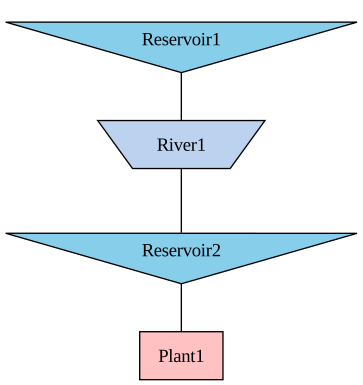
Our example model has one river connecting two reservoirs, and a downstream plant.
#Create a standard ShopSession
shop=ShopSession()

#Build SHOP model
build_model(shop)

#Display topology to the screen
display(shop.model.build_connection_tree())
Run model without any river flow start- or stop costs#
We start by running the model without any start- or stop costs, and plot the resulting flow in the river. As the plot shows, the flow is stopped and started several times during the optimization period.
# Run model
run_model(shop)

# Get river flow
river = shop.model.river.River1
flow = river.upstream_flow.get()

# Plot results
fig = go.Figure()
fig.add_trace(go.Bar(x=flow.index, y=flow.values))
fig.update_layout(xaxis_title="Time", yaxis_title="Upstream flow", title = "River flow")
fig.show()
/opt/conda/lib/python3.13/site-packages/kaleido/_sync_server.py:11: UserWarning:


Warning: You have Plotly version 5.24.0, which is not compatible with this version of Kaleido (1.5.0).

This means that static image generation (e.g. `fig.write_image()`) will not work.

Please upgrade Plotly to version 6.1.1 or greater, or downgrade Kaleido to version 0.2.1.

You can however, use the Kaleido API directly which will work with your plotly version. `kaleido.write_fig(...)`, for example. Please see the kaleido documentation.
Add flow start- and stop costs and rerun model#
We now add a start cost and a stop cost for the river, set the flow_commitment_mip_flag to 1, and rerun the model. As the resulting plot shows, the river avoids starting and stopping by flowing the minimum allowed amount instead.
#Create a new ShopSession
shop=ShopSession()

#Build SHOP model
build_model(shop)

river = shop.model.river.River1

# Add start- and stop costs
river.flow_start_cost_const.set(10)
river.flow_stop_cost_const.set(10)

# Set the minimum allowed flow and the absolute max flow
river.min_allowed_flow.set(5)
river.absolute_max_flow.set(100)
river.flow_commitment_mip_flag.set(1)

# Run model
run_model(shop)

# Get river flow
flow = river.upstream_flow.get()

# Plot results
fig = go.Figure()
fig.add_trace(go.Bar(x=flow.index, y=flow.values))
fig.update_layout(xaxis_title="Time", yaxis_title="Upstream flow", title = "River flow")
fig.show()
Start and stop costs for the first time step#
If no historical flow data is provided, no start- or stop costs will be applied for the first timestep. However, if historical flow data is provided through the past_upstream_flow attribute, the river flow state before the optimization period is used to build the constraints for the first time step.
Binary variables#
The default behaviour is to not use binary variables for the river flow commitment constraints. The use of binary variables can be turned on by the flow_commitment_mip_flag attribute, as shown in the example. The start and stop costs are still modelled with continuous variables when the mip flag is 0 (or not set at all), which means that the minimum allowed flow limit can be violated by taking a fractional start or stop cost.
In the same way as the generator commitment variables are locked in the incremental iterations, the river flow commitment variables can be locked by the lock_river_flow_commitment